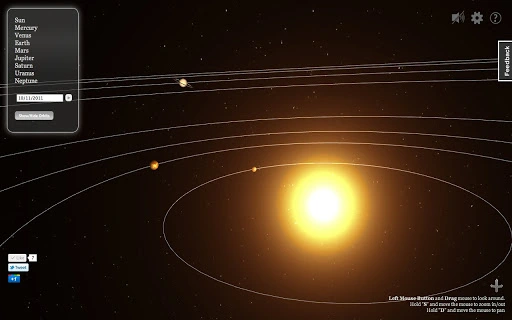

Explore the Solar System in 3D
Overview
This 3D solar system simulation application provides users with an interactive way to observe the approximate positions of planets within our solar system at various points in time. Designed with educational and exploratory purposes in mind, it serves as a visual aid for learning about planetary motion, orbital mechanics, and celestial relationships. The software is particularly suited for students, educators, and astronomy enthusiasts seeking a hands-on digital experience of space science.
By leveraging modern web technologies such as HTML5 and WebGL, the application delivers a visually immersive environment without requiring specialized hardware or external plugins. Real-time visualization of planetary locations allows users to explore past, present, and future configurations, supporting both casual discovery and structured study. The tool is accessible through standard web browsers on supported platforms, enabling broad reach across educational institutions and home users.
The developer did not provide additional details about the organization or background. As such, information about the development team, long-term support, or update frequency remains unavailable. However, the application's focus on accurate planetary positioning suggests a foundation in astronomical data models, though specific sources were not disclosed.
Key Features & Capabilities
- Real-Time 3D Planet Visualization – Displays the current approximate positions of planets using a dynamic 3D model, enabling users to view the solar system from multiple angles.
- Time-Shift Functionality – Allows users to adjust the timeline and observe planetary positions at different historical or future dates, supporting educational exploration of orbital cycles.
- Planet Information Panels – Provides basic facts about each planet, including size, distance from the Sun, orbital period, and other relevant astronomical data.
- Web-Based Architecture – Built using HTML5 and WebGL, ensuring compatibility with modern browsers and eliminating the need for installation on supported operating systems.
- Interactive Controls – Offers intuitive navigation tools such as zoom, pan, and rotation to enhance user engagement and spatial understanding.
These features support real-world usage in classrooms, science fairs, and personal learning. For example, teachers can demonstrate how Mars appears closer to Earth during opposition, or students can simulate planetary alignments over decades. The simulation tool also serves as a supplementary resource for understanding celestial mechanics beyond static diagrams.
User Interface, Workflow & Performance
The user interface is designed around a central 3D viewport, with navigation controls positioned for easy access. The layout prioritizes clarity, placing planet labels, information panels, and timeline sliders in a non-intrusive manner. Interaction is primarily mouse- or touch-based, allowing users to rotate the view, zoom in on specific planets, and adjust the time slider with precision.
Workflow efficiency is enhanced by the application’s direct browser access, meaning no installation or configuration is required. Users can launch the simulation immediately after opening the web page, making it ideal for short-term classroom demonstrations or quick exploratory sessions. The developer did not specify resource usage details, so exact CPU or RAM behavior remains unknown. Performance observations are based on general software behavior patterns for web-based 3D applications.
Stability appears to be consistent with typical browser-based simulations, though long-term usage under high load or on older devices was not tested. The absence of installation requirements reduces the risk of system conflicts, contributing to a reliable user experience across compatible systems.
Compatibility & System Requirements
The application is compatible with Windows and Mac operating systems, as specified. It runs through modern web browsers that support HTML5 and WebGL, which are standard on most current devices. The installation size was not provided, and the software operates entirely within the browser environment, meaning no local file storage or disk space is required for execution.
Exact system requirements were not listed. However, since the application relies on browser-based rendering technologies, users are expected to have up-to-date versions of supported browsers such as Chrome, Firefox, or Safari. The developer did not specify minimum hardware requirements for graphics processing or memory, so performance may vary depending on device capabilities.
Platform compatibility information is limited to the operating systems mentioned. No details were provided about mobile or tablet support, or specific browser versions needed for optimal functionality.
Pros and Cons
Pros
- Free to use with no licensing barriers
- Runs directly in the browser, no installation required
- Accessible on both Windows and Mac systems
- Uses modern web standards (HTML5, WebGL) for smooth 3D rendering
- Offers interactive time-shifting for exploring planetary motion over time
Cons
- Exact system requirements were not disclosed
- No information on update frequency or long-term maintenance
- Performance may vary on older or low-end devices
- Limited to browser-based access, with no standalone desktop version
- Developer background and support channels are not publicly available
FAQ Section
Is this software free to use?
Yes, the software is available at no cost. There are no subscription fees or hidden charges.
Which operating systems does it support?
The application is compatible with Windows and Mac systems, provided the device runs a modern web browser with HTML5 and WebGL support.
Do I need to install anything to use it?
No installation is required. The application runs directly in your web browser, making it accessible immediately upon opening the web page.
Is the software secure to use?
As a browser-based tool that does not require file downloads or permissions, the software poses minimal security risk. Users should ensure they access it through official or trusted sources.
Can I use it offline after downloading?
Since the software runs in the browser and relies on web technologies, it cannot be used offline unless specifically designed for offline mode. The current implementation requires an active internet connection to function.
Final Thoughts + CTA
This 3D solar system simulation tool offers a compelling blend of education and interactivity, delivering accurate planetary positioning through accessible web technology. Its browser-based nature ensures broad compatibility and immediate usability, making it an excellent resource for classrooms, science outreach, and personal curiosity. While the lack of detailed system requirements and developer transparency limits deeper evaluation, the core functionality remains strong and purpose-built.
Students and educators will benefit most from its time-shifting capabilities and real-time visualizations, which bring abstract astronomical concepts to life. The absence of installation and cost barriers further enhances its value as a learning aid. For those interested in exploring space science in a dynamic, visual format, this tool provides a solid foundation.
Download 3D Solar System Simulation Tool now.







